
 English
 Русский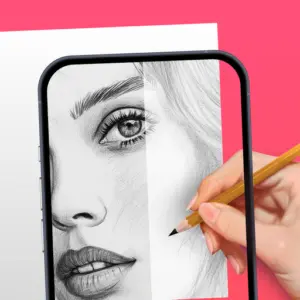


What Is AR Drawing?
AR Drawing is a free Android app that uses augmented reality to help anyone learn how to draw, regardless of skill level. The core idea is simple: your phone’s camera projects a semi-transparent image onto a real surface such as paper, a canvas, or a sketchbook, and you trace the outlines directly. No freehand struggle, no frustration with proportions, just a guided process that builds genuine drawing skills over time.
The app has earned a 4.6-star rating from over 84,000 reviews on Google Play, with a user base spanning complete beginners, hobbyist artists, and anyone who wants a practical tool for tracing and sketching on physical surfaces.
How AR Drawing Works
The process takes only a few steps. You open the app, choose an image from the built-in library or import one from your gallery, then position your phone above a sheet of paper using a stand or tripod. The camera projects the image onto the paper through your screen, and you trace the visible outlines with a pencil. Adjusting the opacity lets you control how strongly the image appears, making it easier to see your own pencil strokes as you work.
Once the sketch is complete, you can color and finish the piece as you would any traditional drawing. The app does not replace the physical act of drawing but makes the process more structured and achievable, which is particularly valuable for beginners who find freehand proportions difficult.
Key Features
AR Projection and Tracing: The app uses your phone’s camera as a live projector, overlaying a selected image onto whatever surface you are drawing on. You trace directly over the projected guide, which removes the guesswork from shapes, proportions, and perspective.
Photo to Sketch Conversion: Any photo from your gallery can be converted into a traceable line sketch using the app’s built-in image conversion tool. This turns personal photos, portraits, and reference images into clean outlines ready for tracing.
Extensive Template Library: The app includes over 1,000 free drawing templates covering a wide range of categories including animals, anime, nature, food, cars, cartoon characters, flowers, tattoo designs, and seasonal themes. New templates are added regularly, keeping the content fresh.
Adjustable Opacity and Image Controls: You can fine-tune the transparency of the projected image so it is easy to see without overwhelming your pencil strokes. Additional controls let you adjust size, rotation, mirroring, edge intensity, and brightness for a more precise tracing experience.
Screen Lock for Stability: A screen lock feature keeps the projected image fixed in place while you draw, preventing accidental movement that would shift the guide mid-stroke.
Built-in Flashlight Support: For drawing in lower light conditions, the app can activate your phone’s flashlight to illuminate the paper and improve visibility.
Time-Lapse Video Recording: You can record the entire drawing session as a time-lapse video and share the result with friends or on social media.
Step-by-Step Drawing Tutorials: The app includes tutorial guides that walk beginners through foundational sketching techniques, covering topics from basic shapes to anime characters, portraits, and animals.
Drawing Pad: A built-in sketchpad lets you draft ideas digitally within the app itself, separate from the AR tracing feature.
Profile and Progress Tracking: An in-app profile tracks your drawing sessions, time spent, and lessons completed, giving you a visible record of improvement over time.
Who It Is For
AR Drawing is designed to work for a broad range of users. Complete beginners benefit most from the structured tracing approach, which builds an understanding of proportions, line weight, and shaping through practice rather than guesswork. Intermediate artists use it as a reference and planning tool, especially for complex subjects like portraits or detailed anime characters. Educators have also used it in classroom settings as a practical way to introduce students to sketching fundamentals.
The app is equally suitable for kids and adults, and the wide range of template categories means there is rarely a shortage of subjects to practice with.
Common Use Cases
Learning to Draw: Tracing projected outlines is one of the most effective methods for developing hand-eye coordination and understanding how shapes connect. Used consistently, the app helps users gradually draw more accurately even without the AR guide.
Sketching Anime and Characters: The anime and cartoon template categories are among the most popular in the app, making it a practical tool for fans who want to reproduce their favourite character art accurately.
Portrait and Realistic Drawing: Converting a personal photo into a traceable sketch lets users attempt portrait work that would otherwise require advanced freehand skill.
Tattoo Design: Artists and individuals planning tattoos use the app to sketch designs directly, getting a sense of scale and detail before committing to anything permanent.
Murals and Large-Scale Art: With a phone positioned at a distance and the image scaled up accordingly, the app can guide larger wall drawings and mural work.
Limitations
- Ad frequency is a consistently cited complaint in user reviews, with some users reporting interruptions during active tracing sessions
- A stable phone mount or tripod is effectively required for comfortable use, as holding the phone while drawing is not practical
- AR projection quality is sensitive to lighting conditions, and very bright or uneven light can reduce tracing accuracy
- Some advanced features and additional content may require a paid upgrade
- Image stability issues have been noted by some users, with the projected outline occasionally shifting during a session
Final Thoughts
AR Drawing fills a genuinely useful gap for anyone who wants to improve their sketching skills but finds freehand drawing frustrating or discouraging. The AR projection method is practical, the template library is deep, and the photo-to-sketch conversion makes it versatile beyond just pre-built content. Ad volume on the free version is a real drawback, and a steady phone mount is essentially a prerequisite for a smooth experience. With over 84,000 ratings averaging 4.6 stars, the app has clearly resonated with a wide audience, from casual users tracing cartoon characters to artists using it as a reference tool for serious work.