 English
 Русский
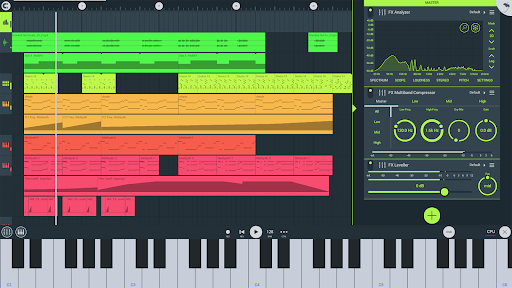
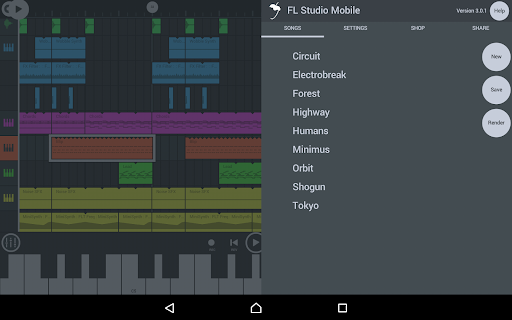
What Is FL Studio Mobile?
FL Studio Mobile is a full-featured digital audio workstation (DAW) for Android, developed by Image-Line, the Belgian company behind the desktop FL Studio software. Originally launched on June 21, 2011 as FL Studio Mobile and FL Studio Mobile HD for iOS, the app arrived on Android via Google Play in April 2013. In October 2016, Image-Line released FL Studio Mobile 3, a completely rebuilt version developed in-house that replaced the earlier Artua-developed editions. The current version, 4.9.6, was updated on January 19, 2026.
The app is available on Android, iOS, Windows, Chrome OS, and macOS, and can also run as a native plugin inside the FL Studio desktop application. It allows musicians, producers, and beatmakers to record, sequence, edit, mix, and export complete multi-track projects directly from a phone, tablet, or Chromebook, with no desktop required. The desktop version of FL Studio is downloaded over 30,000 times per day, and the mobile app carries that same pattern-based production philosophy into a touchscreen environment.
FL Studio Mobile has been downloaded over 1.2 million times on Android alone, holds a 4.02 out of 5 rating based on 37,000 reviews on Google Play, and is currently ranked number one in the Music and Audio category on the platform.
A Brief History of Image-Line and FL Studio
Image-Line began as a small Belgian software company before Didier Dambrin, known in the community as Gol, developed an early step sequencer that would eventually become FruityLoops. The program launched in the late 1990s and quickly outgrew expectations, drawing so many demo downloads that it strained the company’s servers. Image-Line later renamed the software to FL Studio after Kellogg’s challenged the FruityLoops trademark in the United States. The rebrand proved effective. FL Studio is now recognized as one of the most widely used music production tools in the world, and FL Studio Mobile extends that legacy to mobile devices.
How FL Studio Mobile Works
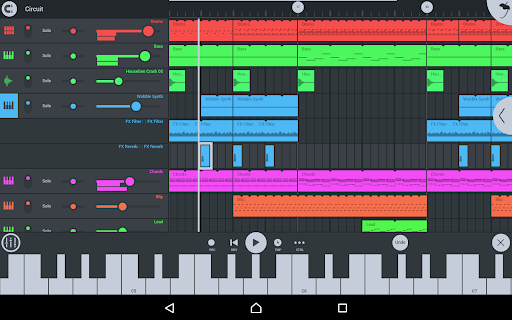
FL Studio Mobile follows the same pattern-based production approach as its desktop counterpart. The core concept is built around a step sequencer and piano roll, where users construct musical patterns and arrange them into a full track through a playlist view. This WYSIWYG (what you see is what you get) approach to music-making makes the workflow accessible without stripping away the depth that experienced producers expect.
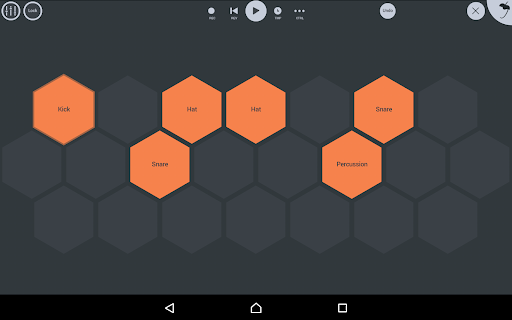
Setting up a project starts with selecting instruments and building patterns in the step sequencer or piano roll. Tracks can be created by programming notes step by step, drawing them into the piano roll, or recording in real time using the on-screen keyboard or drum pads. The mixer handles per-track volume, panning, muting, soloing, and effect routing. Once a project is finished, it can be exported in WAV, MP3, AAC, FLAC, or MIDI formats, or shared over Wi-Fi or cloud sync to other FL Studio Mobile installations.
Projects saved on Android can also be loaded directly into the FL Studio desktop plugin version, making the app a practical companion for producers who start ideas on mobile and complete them on a full DAW.
Key Features
Step Sequencer and Piano Roll
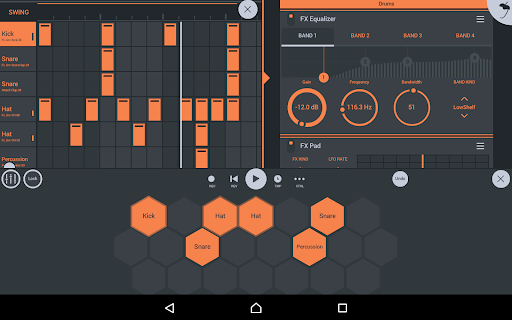
The step sequencer is one of the fastest ways to program percussion and rhythmic patterns in any mobile DAW. It is familiar to anyone who has used FL Studio on desktop and translates well to a touchscreen. The piano roll sits alongside it for melodic and harmonic composition, offering the ability to add, edit, and adjust notes with precision. Both tools are quick to navigate and logically laid out, keeping the production process moving rather than interrupting it with menu complexity.
Instruments and Sound Library
All instrument modules are included in the base purchase, with no core content locked behind additional purchases. The included instruments are:
- Drum Sampler for percussion programming
- DirectWave Sample Player for high-quality sampled instruments
- GMS (Groove Machine Synth) for electronic and synthesized sounds
- Transistor Bass for bass lines and low-frequency synthesis
- MiniSynth with presets covering Bass, Keys, Leads, Pads, SFX, and Synths
- SuperSaw with presets covering Arps, Bass, Bells, SFX, Leads, Pads, Sequences, and Synths
The DirectWave library includes guitars, keyboards, orchestral instruments, synth leads, synth pads, sliced loops, and drum kits. The included drum samples cover cymbals, hats, kicks, snares, toms, percussion, risers, and SFX. Users can also install their own samples in .zip or .instr format without needing to purchase additional packs, though an in-app shop provides optional content for those who want to expand beyond the bundled library.
Version 1.0 shipped with 133 sampled instruments covering classical, jazz, rock, and electronic styles, a number that has grown considerably with subsequent updates.
Effects Modules
Every effect module is included at purchase. The full effects list covers:
- Analyzer (visual)
- Auto Ducker
- Auto-Pitch (pitch correction)
- Chorus
- Compressor and Limiter
- Distortion and Waveshaper
- Parametric Equalizer and Graphic Equalizer
- Flanger, Phaser, and Reverb
- Delays
- High-Pass, Low-Pass, Band-Pass, and Formant (Vox) Filters
- Stereoizer
- Tuner (Guitar, Vocal, and Instrument)
Effects can be applied to individual tracks or to the full mix. The effects stack is clean and well-organized, with controls like EQ available as optional channel modules rather than cluttering the mixer by default. Automation is handled through event clips that can be placed in the playlist to add movement and variation across an arrangement.
Chord Keyboards and Pitcher 2
Version 4.6.1 introduced two notable additions. Chord Keyboards added two new keyboard interfaces for playing, strumming, and experimenting with chords, which broadens the appeal of the app for musicians who work with harmonic arrangements rather than individual notes. Pitcher 2, also introduced in that update, brought a new pitch-correction and pitch-manipulation algorithm with advanced real-time controls and sibilant processing, making it a more capable vocal processing tool than the basic Auto-Pitch included in earlier versions.
Channel Rack Presets and Missing Sample Recovery
Channel Rack Presets, added in version 4.6.1, allow users to save, load, and share entire Channel Rack configurations as a single preset. This is a practical workflow improvement for producers who work across multiple projects with similar instrument setups.
Missing Sample Recovery, added in the same update, automatically searches for files with the same name in other locations when a sample cannot be found at its original path. This reduces the friction of managing large sample libraries across different devices or after file reorganization.
Audio Recording and Stem Import
FL Studio Mobile supports live audio recording from external and internal sources, making it possible to capture vocals, instruments, or any other audio directly into a project. Track-length stem and WAV import allows full audio files to be brought into the timeline, which is useful for working with pre-recorded material or stems from other projects.
MIDI Controller Support and Automation
The app supports class-compliant MIDI controllers, connecting via USB or Bluetooth Low Energy. Physical MIDI keyboards, drum pads, and control surfaces all work within the app, and MIDI files can be imported and exported in both single-track and multi-track formats. Automation is fully supported across instruments and effects, giving producers precise control over how parameters move and change throughout a track.
Mixer
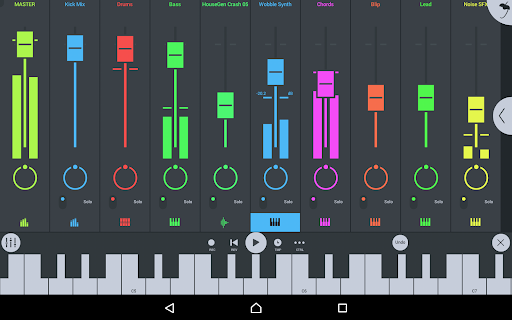
The mixer handles per-track mute, solo, effect bus routing, panning, and volume. Controls are kept minimal by design, with EQ and other tools available as modular add-ons rather than permanent fixtures on every channel. This keeps the screen uncluttered without removing functionality. The overall design philosophy favors efficiency over visual complexity, which works well on both phone and tablet screen sizes.
Cross-Platform Project Sharing
Projects can be moved between Android, iOS, and Windows installations using Wi-Fi sync or cloud sharing. The app also loads directly into the FL Studio desktop plugin version, so a project started on an Android device can be picked up and completed in FL Studio on a Windows or macOS machine without any format conversion. This cross-platform continuity is one of FL Studio Mobile’s most practical advantages over competing mobile DAWs.
Interface and Screen Support
The interface scales to all screen resolutions and sizes, with full-screen DeX and Chromebook support for touch, trackpad, and mouse input. The layout uses high-contrast colors and clearly labeled icons, making navigation manageable even on smaller phone screens. A dark, modern aesthetic keeps the visual environment consistent with production-focused applications. Tablet and Chromebook users get a noticeably better experience due to the additional screen space, though phone use remains entirely functional.
Performance and Compatibility
FL Studio Mobile runs on Android 4.1 and above, with the APK weighing in at approximately 342 MB. The app performs well on mid-range and higher-end hardware, and Image-Line has noted that it works on Android 5 devices, though higher-spec hardware delivers a noticeably better experience. Chromebook users in particular benefit from improved performance and a resolution display that works correctly, unlike many mobile apps that do not scale well to Chromebook screens.
Some latency between input and audio output has historically been a known limitation of Android as a platform for real-time audio applications. Real-time recording using on-screen instruments can be affected on older or lower-powered devices, though this varies by hardware. Image-Line continues to issue regular updates, with the release history showing multiple patches per month addressing stability, crash fixes, and feature refinements.
Custom ROMs and rooted devices are not officially supported.
Pricing and In-App Purchases
FL Studio Mobile costs $14.99 on Google Play as a one-time purchase. In-app purchases are available for additional DirectWave sample content through the in-app shop, but the full set of instrument and effect modules is included with the base download. Users can also install their own samples without buying anything additional through the shop.
The desktop version of FL Studio starts at $99 and includes lifetime free updates. FL Studio Mobile also receives ongoing free updates, with Image-Line maintaining an active release schedule and a dedicated user support forum with official technical staff.
FL Studio Mobile vs. Competing Mobile DAWs
FL Studio Mobile sits in a competitive space alongside tools like GarageBand, BandLab, Cubasis, and Audio Evolution Mobile Studio. Compared to free options like BandLab and GarageBand on iOS, FL Studio Mobile carries a price tag, but it offers the ability to load projects directly into the FL Studio desktop environment, which is a significant advantage for producers already in the Image-Line ecosystem. The pattern-based workflow, comprehensive effects library, and full instrument set included at no extra cost differentiate it from apps that gate core content behind additional purchases.
For Android specifically, FL Studio Mobile remains one of the most complete DAW options available, given that many major music production apps have historically been iOS-first or iOS-only.
Pros and Cons
What works well:
- Full instrument and effects library included with the base purchase
- Projects load directly into FL Studio desktop for seamless continuation
- Cross-platform sharing between Android, iOS, and Windows
- Pattern-based workflow is approachable for beginners and efficient for experienced producers
- Regular updates with active developer support
- Excellent Chromebook and DeX support
Worth knowing before you buy:
- Real-time audio recording can suffer from latency on older Android devices
- The piano roll and song editor are less feature-complete than the desktop version
- Some users have reported MIDI import issues and occasional crashes on recent updates
- Custom ROMs and rooted devices are not supported
- The sound library leans toward electronic genres, which may not suit all production styles
Final Thoughts
FL Studio Mobile is one of the most capable music production apps available for Android. It brings a recognizable workflow, a complete set of instruments and effects, and genuine cross-platform utility to mobile producers who want more than a basic beat-making tool. The learning curve is gentle enough for newcomers to the DAW world, and the connection to FL Studio desktop makes it a practical on-the-go companion for producers who already work within the Image-Line ecosystem. At $14.99 with no subscription and free updates, it represents solid value for anyone serious about making music from their phone or tablet.
Similar Music & Audio Apps
If you find FL STUDIO MOBILE useful, you might also want to explore Spotify Premium, SoundCloud and Muzio Player. These are top-rated Music & Audio apps for Android that complement FL STUDIO MOBILE well and offer additional functionality.

 78.28 Mb
  v9.0.84.1313