
 English
 Русский
What Is Panda Mouse Pro?
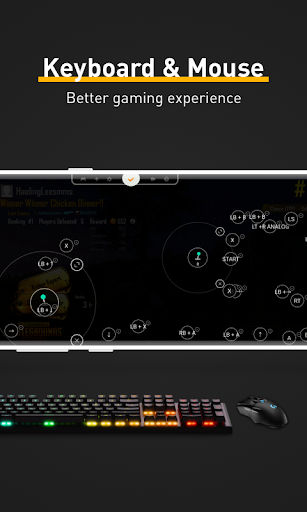
Panda Mouse Pro is a paid keymapper application for Android, developed by Panda Gaming Studio. It lets players connect a physical keyboard and mouse to their smartphone or tablet and translate those inputs into precise touchscreen commands. For anyone who has struggled with the cramped, imprecise nature of touch controls in competitive games, this app closes a significant gap between mobile and PC gaming.
The app is available on the Google Play Store and is currently on version 9.2. It costs $5.99 to download and has accumulated over 380,000 downloads, averaging roughly 160 new installs per day. It requires Android 6.0 or higher and carries a content rating suitable for all ages.
Where traditional keymappers rely on cloning a game’s package to function, Panda Mouse Pro takes a different approach. It runs games directly from the original installation, which eliminates compatibility headaches and keeps your account progress tied to the official version of the app.
How Panda Mouse Pro Works
At its core, Panda Mouse Pro sits between the Android operating system and whatever game you are playing. Every mouse movement and keypress is captured by the app and converted into a corresponding tap or swipe at a specific location on the touchscreen. From the game’s perspective, everything looks like normal touch input, which is a key part of how the app avoids triggering anti-cheat systems.
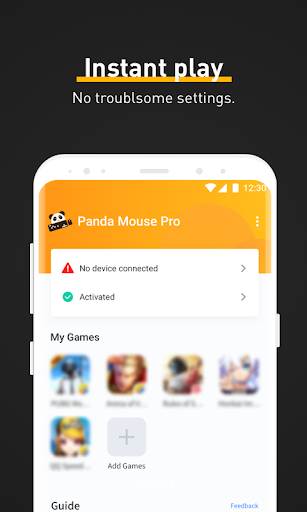
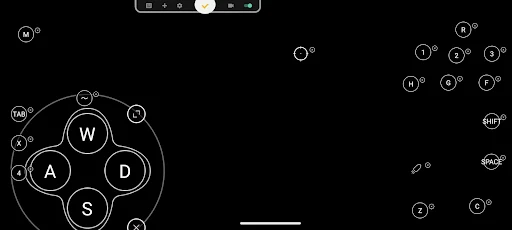
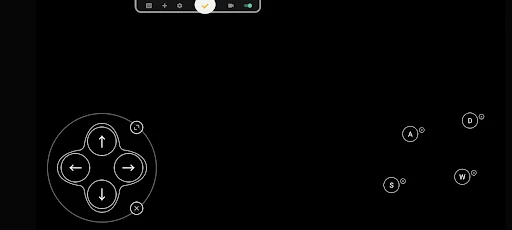
Setting up the app follows a straightforward sequence. After installation, you open Panda Mouse Pro, select the game you want to play from the supported list, and configure your key mappings using a visual overlay. You drag virtual buttons onto the screen, assign them to physical keys, adjust mouse sensitivity, and save the layout as a named profile. The next time you launch that game through the app, the same profile loads automatically, so there is no repeat setup on every session.
The activation process varies depending on which version of Android you are running. On Android 11 and above, activation happens directly on the device. Android 10 and below requires a one-time connection to a PC or Mac to run the activator tool. Rooted devices activate automatically. It is worth noting that some users have reported needing to reactivate after rebooting their device on older Android versions, which is a genuine inconvenience for anyone who does not have regular access to a computer.
Key Features
Direct Game Launch
One of the standout differences between Panda Mouse Pro and older keymapper tools is that it does not require you to clone your games. You launch titles directly from inside the app, and updates continue to arrive through the normal Play Store channels. There is no need to maintain separate copied installations or worry about those copies falling behind on patches.
Anti-Ban Technology
Games that actively penalize players for running duplicate app instances have historically been a problem for keymapping tools. Panda Mouse Pro’s architecture avoids that issue by design, since the game runs as its original self rather than a cloned copy. The app’s built-in protections are specifically aimed at anti-cheat systems that flag duplication-based tools.
Universal Hardware Compatibility
The app works with virtually all keyboard and mouse brands that can connect to an Android device, whether through a USB OTG cable, a wireless dongle, or Bluetooth. This is a practical advantage for anyone who already owns peripherals from their PC setup, since there is no need to buy specific branded hardware to get started.
Customizable Key Mapping and Profiles
Each game can have its own dedicated control profile, with button positions, key assignments, and sensitivity tuned independently. A close-quarters shooter build does not need to share settings with a long-range sniping layout, and switching between profiles for different game modes takes only a few taps. For players who compete across multiple titles, managing separate profiles keeps each gaming session feeling exactly the way they have configured it.
Adjustable Mouse Sensitivity
Mouse sensitivity can be fine-tuned per profile, which makes a noticeable difference in FPS and battle royale games where aim precision is directly tied to performance. Fast, snappy sensitivity suits players who prefer flicking between targets, while a slower setting gives more control for precise long-range shots. The app allows these adjustments without changing global system settings, so the configuration stays contained within each gaming profile.
Macro Support
For games that involve repetitive sequences, such as farming resources in an RPG or chaining skill combos in a fighting game, Panda Mouse Pro supports macro commands. A macro records a sequence of actions and ties them to a single keypress. Recent updates have added features like key name labels for macro commands, loop controls that stop on key release, and the ability to trigger macros with the left mouse button.
Smooth Mouse Movement Simulation
The app translates physical mouse movement into fluid on-screen motion, which is particularly valuable in FPS titles where dragging a finger across glass cannot replicate the consistency of a real mouse. Sensitivity options let players dial in the exact feel they want, though some users on high-refresh-rate displays (120Hz) have noted occasional frame-skipping during fast swipes, something the developer continues to address in updates.
Google Play Login Support
Account progress syncs through your standard Google Play login, so grinding for unlocks, skins, and ranking points does not carry any risk of being lost to a third-party account system. This mirrors the convenience of cloud saves on dedicated gaming consoles and is a meaningful advantage over older tools that required separate logins.
Dark Mode Interface
The app uses a dark-themed UI that keeps the dashboard clean and easy to navigate during setup. It is a small detail, but a well-designed interface reduces the friction of configuring controls before a gaming session, and the dark aesthetic fits naturally into the mobile gaming environment.
Supported Games
Panda Mouse Pro supports a broad range of mobile game genres, including first-person shooters, MOBAs, battle royales, and sports titles. Popular games that work with the app include PUBG Mobile, Call of Duty Mobile, and Fortnite. The developer acknowledges a small number of edge-case applications that may not be compatible, but the supported list covers the vast majority of competitive titles available on Android.
The app also features automatic game detection, identifying compatible titles that are already installed on your device and prompting you to configure a profile.
Panda Mouse Pro vs. Other Keymappers
The key differentiators come down to how the app handles game access and account security. Competing tools like Octopus offer wide game support and mapping flexibility, but setup can be more involved. Game Controller KeyMapper provides solid mapping options but lacks the seamless direct-launch approach that Panda Mouse Pro uses. The no-clone architecture is the feature that sets Panda Mouse Pro apart most clearly, since it avoids the account and ban risks that come with running duplicate app instances.
Pricing and Availability
Panda Mouse Pro costs $5.99 as a one-time purchase on Google Play. There is no ongoing subscription required. The app is developed and maintained by Panda Gaming Studio, which also produces related tools including Panda Gamepad Pro, Panda Touch Pro, and Panda Keymapper for those who use different input devices or have specific 64-bit game requirements.
Pros and Cons
What works well:
- No game cloning required, which simplifies setup and keeps accounts safe
- Works with nearly all keyboard and mouse hardware
- Per-profile sensitivity and key mapping covers multiple games cleanly
- Macro support handles complex input sequences
- Activation on Android 11 and above requires no PC
Worth knowing before you buy:
- Android 10 and older devices need a PC or Mac for activation, and some users report needing to repeat this after reboots
- A small number of extreme or heavily protected titles are not supported
- Frame-skipping has been reported at high display refresh rates during fast mouse movements
- Only keyboard and mouse input is supported; gamepads require a separate Panda app
Final Thoughts
Panda Mouse Pro fills a specific and real gap for Android gamers who want the precision of a keyboard and mouse setup without switching to a PC. The direct-launch approach, broad hardware compatibility, and per-game profile system make it a practical tool for competitive players who spend serious time in shooters and MOBAs. The activation requirement on older Android versions is a friction point, but on devices running Android 11 or newer, the experience is considerably smoother. At $5.99 with no recurring fees, it represents a reasonable investment for anyone looking to close the control gap between mobile and desktop gaming.
Similar Tools Apps
If you find Panda Mouse Pro useful, you might also want to explore TeraBox Premium, ExpressVPN: Fast & Secure VPN and SHAREit. These are top-rated Tools apps for Android that complement Panda Mouse Pro well and offer additional functionality.
Related Posts

ExpressVPN: Fast & Secure VPN
Updated
 76 MB
76 MB
 v12.58.0
 Unlimited Accounts For Free

TeraBox Premium
Updated
116 MB
v4.13.7
Premium Unlocked

ZArchiver Donate
Updated
4.62 Mb
v1.0.10
MOD

SHAREit
Updated
13.54 Mb
v1.1.98
premium

vpnify
Updated
31.3 Mb
v2.2.9
unlimited

Clone App-Parallel Dual Space
Updated
41 MB
v4.0.1
Premium Unlocked