
 English
 Русский
What Is Torque Pro?
Torque Pro (OBD 2 & Car) is a paid Android app developed by Ian Hawkins that turns your smartphone or tablet into a professional-grade vehicle diagnostic tool. It connects to your car’s onboard computer through a Bluetooth OBD2 adapter plugged into the diagnostic port and gives you real-time access to engine data, fault codes, performance metrics, and sensor readings that would otherwise require an expensive workshop scanner to retrieve.
The app works on any Android device running Android 2.1 and above, including tablets. It is compatible with virtually all vehicles built after 2000 that use the OBD2 standard, and it covers a broad range of manufacturers including Ford, GM, Vauxhall, VW, Audi, BMW, Mercedes, Toyota, Honda, Nissan, Hyundai, Kia, Subaru, Mazda, Mitsubishi, Renault, Citroën, Peugeot, Skoda, Seat, Chrysler, Dodge, Jeep, Jaguar, Lexus, and many more. Some vehicles from the mid-1990s are also supported. A free version called Torque Lite exists but is limited to basic ECU codes and carries ads. Torque Pro unlocks the full feature set.
What You Need to Get Started
Torque Pro requires a Bluetooth OBD2 adapter to function. This small dongle plugs into the diagnostic socket found under the steering wheel on the driver’s side. Once plugged in and paired with your phone via Bluetooth, the app connects to the car’s engine management system and begins pulling data. The adapter acts as the bridge between your phone and the vehicle’s onboard computer.
Popular compatible adapters include the BAFX and OBDLink LX. Cheap clone adapters are widely available but can introduce connection instability and slower data refresh rates. A genuine ELM327-chipset adapter is the recommended choice for reliable performance, particularly when logging multiple sensor parameters simultaneously. Garmin EcoRoute HD adapters are not supported.
Setup involves pairing the adapter through Android’s Bluetooth settings, launching Torque Pro, navigating to adapter settings, and selecting the paired device. Some vehicles require the engine to be running rather than just in accessory mode before the app can read ECU data.
Key Features
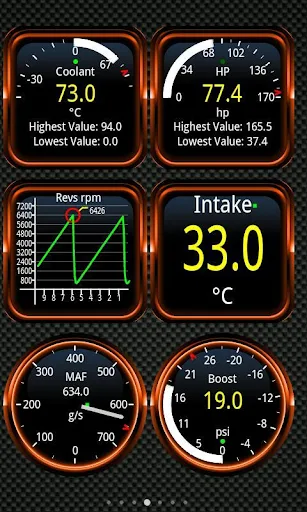
Real-Time Sensor Monitoring: Torque Pro displays live data from the car’s engine management system including RPM, vehicle speed, coolant temperature, intake air temperature, throttle position, mass air flow rate, fuel trim, turbo boost pressure, transmission temperature, and battery voltage. The data refreshes continuously while driving and is presented through customizable gauges and dials on your dashboard.
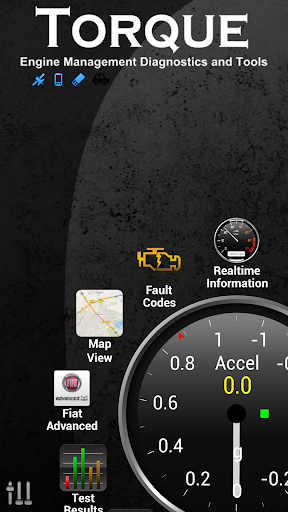
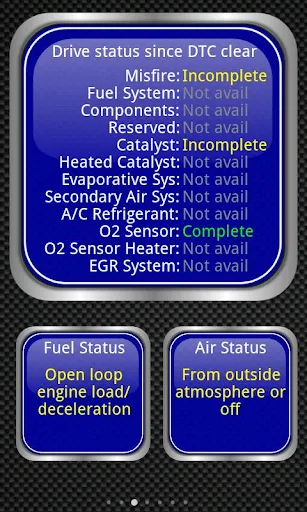
Fault Code Reading and Clearing: The app reads Diagnostic Trouble Codes (DTCs) from the vehicle’s ECU and translates them into plain-language descriptions using a large built-in fault code database covering codes from multiple manufacturers. Once a fault has been diagnosed and addressed, Torque Pro can reset the check engine light directly from the app, removing the need to visit a dealership for what is often a charged service.
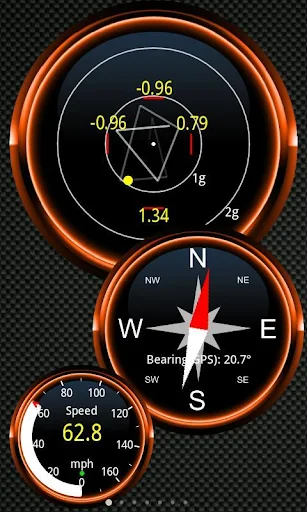
Customizable Dashboard: The dashboard is fully configurable. You choose which widgets and gauges appear, arrange them in any layout you prefer, and save multiple profiles for different vehicles or monitoring setups. The app supports themes, allowing the visual style of the dashboard to be changed to suit personal preference or ambient conditions.
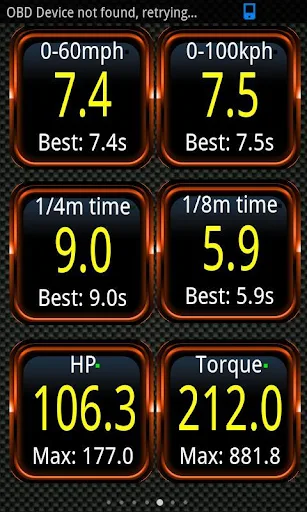
Built-in Dynamometer: Torque Pro includes a dyno function that calculates your vehicle’s horsepower and torque output in real time. This allows performance enthusiasts to measure engine output without requiring a dedicated rolling road session.
0-60 and Acceleration Timing: The app uses a combination of OBD2 sensor data and GPS to calculate 0-60 mph sprint times more accurately than GPS alone. This is particularly useful for comparing performance before and after modifications or tuning changes.
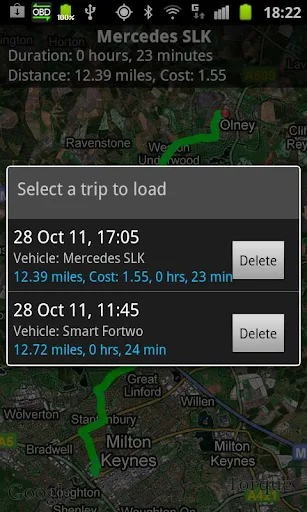
GPS Tracking and Trip Logging: Torque Pro integrates with the phone’s GPS to log trip routes overlaid with OBD engine data. This allows you to see exactly what the engine was doing at any specific point during a journey, which is useful for diagnosing intermittent faults that only occur under specific driving conditions.
Track Recorder Plugin: The Track Recorder plugin, available separately, records video of your drive with real-time OBD data overlaid directly onto the footage. The result is a dashcam-style black box recording that simultaneously shows vehicle speed, RPM, boost pressure, and other parameters alongside the road.
HUD Mode: A heads-up display mode projects key data in a format suitable for night driving, sized and positioned for easy reading on the windscreen without distracting from the road.
CO2 Emissions and Fuel Economy: The app calculates CO2 emissions output and fuel consumption in real time, including miles per gallon readouts. This makes it useful for monitoring efficiency on long trips or for diagnosing fuel economy problems.
Custom PIDs: Beyond the standard OBD2 parameter set, Torque Pro supports custom Parameter IDs (PIDs), allowing users to query manufacturer-specific sensor data that falls outside the universal OBD2 standard. This is particularly valuable for vehicles with proprietary ECU parameters, such as certain VW, Audi, and Golf models with MAP and MAF sensor data for turbo boost monitoring.
Alarms and Voice Alerts: Custom alerts can be set for any monitored parameter. If coolant temperature exceeds a defined threshold or oil pressure drops below a safe level while driving, the app triggers an audible warning with optional voice overlay, providing an early warning system that operates in real time.
Data Logging and Sharing: Session data can be logged and exported as CSV or KML files, which can be opened in Excel or mapping software for detailed post-drive analysis. Logs can also be uploaded to the Torque web viewer for online review or shared with a mechanic via email. The app also supports sharing screenshots directly to social media platforms.
GPS Compass: A GPS-based compass is included that avoids the magnetic interference issues that affect hardware compasses in many phones.
Third-Party Plugin Support: Torque Pro exposes an AIDL API and Telnet interface that allows third-party developers to build plugins extending the app’s functionality. A plugin ecosystem has grown around this, adding features such as additional display options, extended manufacturer support, and custom data visualizations.
Vehicle Compatibility
Torque Pro works with any vehicle using the OBD2 standard, which covers most cars manufactured from 2000 onward and a range of vehicles back to 1996. The OBD2 port location varies by vehicle but is typically under the steering column on the driver’s side. Users uncertain about compatibility should check their vehicle manual or look for an OBD2 compliance label in the engine bay. Tablet support includes devices such as the Samsung Galaxy Tab, Motorola Xoom, Dell Streak, and Nook.
Some ECUs expose more parameters than others. Transmission temperature, for example, is listed as vehicle-dependent. Turbo boost monitoring through MAP and MAF sensors works specifically on compatible VW, Golf, Audi, and Seat variants. Users with unusual or highly modified vehicles may find that not every feature performs as expected.
Torque Pro vs. Torque Lite
Torque Lite is the free version of the app. It provides basic access to ECU fault codes but strips out the majority of the features available in the paid version, including custom dashboards, performance tools, GPS logging, data export, and advanced sensor monitoring. It also runs ads throughout. For any serious use beyond a quick code check, Torque Pro is the practical choice, and the one-time purchase price is low relative to the cost of even a single dealership diagnostic appointment.
Limitations
- Torque Pro has not received significant updates in recent years, which some long-term users have noted as a concern for ongoing development and compatibility with newer Android versions
- Initial setup can be confusing for users unfamiliar with OBD2 concepts, with limited in-app documentation to guide first-time users through the configuration process
- Performance and reliability are heavily dependent on the quality of the OBD2 adapter used. Cheap clone adapters frequently cause pairing failures, slow data refresh, and dropped connections
- Some advanced manufacturer-specific parameters are not accessible through the standard OBD2 interface and require custom PIDs that must be sourced and entered manually
- The interface, while functional, looks dated compared to newer diagnostic apps and lacks the visual refinement of more recently developed alternatives
- Certain features such as transmission temperature and turbo boost monitoring are vehicle-dependent and may not be available on all cars
Final Thoughts
Torque Pro occupies a well-established position among Android OBD2 apps, and for good reason. The combination of real-time sensor monitoring, fault code reading and clearing, a customizable dashboard, built-in dyno, GPS trip logging, and custom alert capabilities covers everything a car owner or enthusiast would realistically need from a mobile diagnostic tool. The app is not the most visually polished option available today, and the pace of updates has slowed, but the core functionality remains solid and the one-time cost is justified many times over by what you save on diagnostic fees alone. For anyone with an Android device and a Bluetooth OBD2 adapter, it remains one of the most capable and cost-effective vehicle diagnostic tools on the platform.
Similar Communication Apps
If you find Torque Pro (OBD 2 & Car) useful, you might also want to explore Truecaller and Temp Mail. These are top-rated Communication apps for Android that complement Torque Pro (OBD 2 & Car) well and offer additional functionality.

 107.7 Mb
  v26.10.6